Accelerate surround mixing in Pro Tools®
Spill mimics the “spill” feature on high-end digital film consoles — letting you adjust channel levels on surround audio and bus tracks from the Pro Tools® mixer, an S6 or S3, or any other control surface.
Mac & Windows · AAX Native, DSP & AudioSuite · iLok
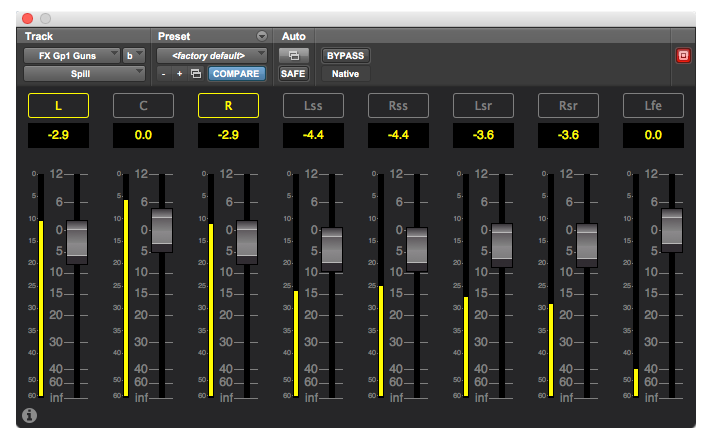
Get control of your surround tracks
Every channel of every surround stem, individually addressable — without splitting tracks, routing through aux paths, or wrestling with the mixer.
Up to 16 channel faders
One fader per surround channel — with meters and gain readouts. Works from stereo all the way up to 9.1.6.
Channel grouping
Lock channels together at their current relative levels — pair L/R, link the surrounds, or group whatever combinations make sense for the mix.
Fine adjustment
Hold ⌘ or Alt for sub-dB precision on any fader.
AAX Native, DSP, and AudioSuite
Use it on a Pro Tools HDX rig with no CPU hit, on Pro Tools Native, or as a render-in-place tool.
S6 & S3 integration
Spill maps directly onto the Avid S6 and S3 expand-mode displays. Touch a surround channel on the surface to focus and adjust.
Pro Tools Dock
Spill maps onto the Pro Tools | Dock for hands-on per-channel control alongside your main mixer.
- AAX Native
- AAX DSP
- AudioSuite
Surround layouts
One plug-in for everything you mix — stereo through 9.1.6 immersive and third-order Ambisonics.
Standard surround
Stereo through 7.1, including DTS and SDDS variants.
- Stereo
- LCR
- LCRS
- Quad
- 5.0
- 5.1
- 6.0
- 6.1
- 7.0 (DTS)
- 7.1 (DTS)
- 7.0 (SDDS)
- 7.1 (SDDS)
Immersive with height
Every Dolby Atmos bed layout Pro Tools supports — up to 9.1.6.
- 5.0.2
- 5.1.2
- 5.0.4
- 5.1.4
- 7.0.2
- 7.1.2
- 7.0.4
- 7.1.4
- 7.0.6
- 7.1.6
- 9.0.4
- 9.1.4
- 9.0.6
- 9.1.6
Ambisonics
First, second, and third-order ambisonic beds — up to 16 channels.
- 1st Order (4 ch)
- 2nd Order (9 ch)
- 3rd Order (16 ch)
Built for mixers to get the job done
Spill earns its keep on the sessions where individual channel control matters most.
Final mix
Ride a center channel under dialog without splitting the stem. Pull a surround LFE down on a single hit. Stay in the flow of the dub stage.
Pre-dubs
Build cleaner pre-dubs by trimming channel-by-channel before the final mix gets near them.
Sound design
Sculpt surround beds with the same per-channel access you'd have on a high-end console — without rendering, splitting, or printing stems.
How it fits your rig
Drop it on a surround track
Insert Spill on any surround or bus track in Pro Tools®. The plug-in auto-detects the channel format and surfaces one fader per channel.
Control from anywhere
Mouse, keyboard, or Avid S6/S3 expand mode. Multiple operators on the same mix at the same time.
Group and ride
Group L/R, tie surrounds together, drop into fine-adjustment mode for sub-dB rides. The rest of the session keeps working the way you set it up.
What re-recording mixers are saying
“Spill is huge on a final dub. The channel-by-channel control turns a 20-minute exercise into a 30-second one.”
“The S6 expand-mode integration alone is worth it. Touch the channel, adjust the channel.”
“I haven't split a surround stem to fix a single channel since I installed it.”
Try Spill
Seven days, no card required. Every feature unlocked.
Spill plug-in
- AAX Native + AAX DSP + AudioSuite
- Mac & Windows
- Stereo through 7.1.2 and Ambisonics
- Avid S6, S3, and Pro Tools | Dock supported
- iLok licensing
Built by Neyrinck
From the creators of PT Peek, V-Control Pro, V-90 Symphonic, and SoundCode — trusted tools used by audio professionals worldwide. Spill is in active use in mixing stages from Los Angeles to London.
Download the trial